Orders
Overview
Within the orders overview all orders are displayed.
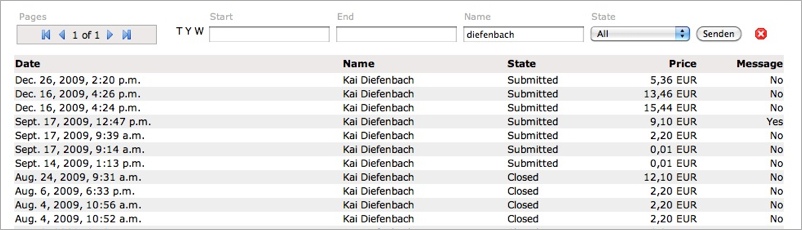
Navigation / Filtering
You can filter and navigate through the displayed orders:

With the page navigation you can navigate through all orders.
To filter the orders by name just fill in the name field and click
Submit.To filter the orders by state just select the state and click
Submit.To filter the orders by date just fill in Start and End (YYYY-MM-DD) and click
Submit. For convenience you can click on the links left beside the start field. T = today, Y = yesterday, W = week.To reset the filter just click on the red
Xbutton.
Sorting
Note
Sorting is not available at the moment.
Details
To view a order in detail just click on the order.
Details
Within the order detail view you can see several information about a single order:
The general information: customer name, e-mail address and phone. The date, state and total amount of the order.
Shipping and invoice address of the customer. The shipping and payment method of this order.
The order items.
On the left you can see all other orders. Just click on an order to see it in detail.
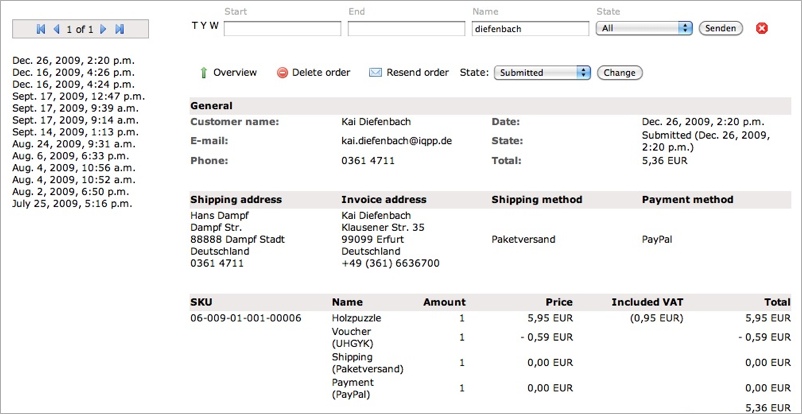
Navigation / Filtering
You can filter and navigate through the displayed orders on the left:
With the page navigation you can navigate through all orders.
To filter the orders by date just fill in Start and End (YYYY-MM-DD) and click
Submit. For convenience you can click on links beside the start field. T = today, Y = yesterday, W = week.To filter the orders by name just fill in the name field and click
Submit.To filter the orders by state just select the state and click
Submit.To reset the filter just click on the red
Xbutton.
Actions

- Delete order
To delete the current order just click on the
Delete orderbutton and answer the confirmation question withYes.- Resend order
You can resend the current displayed order to the customer. To do that click on the
Resendbutton and answer the confirmation question withYes.- Change state:
To change the state of the current order select the desired state and click on the
Changebutton.