django-lfs
  • Overview
  • Installation
  • Upgrade notes
  • Getting Started
  • Products
  • Categories
  • Manufacturers
  • Criteria
  • Properties
  • Local Properties
  • Taxes
  • Static Blocks
  • Portlets
  • Actions
  • Delivery Times
  • Shipping Methods
  • Payment Methods
  • Marketing
  • Reviews
  • Page
  • Images
  • Shop
  • Catalog
  • Properties
  • HTML
  • Customers
  • Marketing
    • Featured
      • Navigation / Filtering
      • Add featured products
      • Update featured products
      • Remove featured products
      • See also
    • Top seller
    • Discounts
    • Vouchers
    • Rating Mails
  • Utilities
  • How To Add a Horizontal Menu
  • How To Add a Product with Variants
  • How To Add a Configurable Product
  • How To Add a Product with Filters
  • How To Manage Payment Methods
  • How To Manage Shipping Methods
  • How To Setup Paypal
  • How To Add a Export Script
  • How To Use Celery
  • Developing LFS
  • Testing LFS
  • Benchmarking LFS
  • Changing models
  • Contributing translations
  • API
  • Settings
  • Management commands
  • How to add own addresses
  • How to add own templates
  • How to add an own payment processor
  • How to add custom product pricing module
  • How to use localized addresses
  • How to create a product export script
  • How to add own action groups
  • How to create a theme
  • How to add an own order numbers generator
  • How to add an own shipping price calculator
  • How to integrate localized version of TinyMCE
  • How to add own criteria
  • Contributing translations
django-lfs
  • Marketing
  • Featured
  • View page source

Featured

This section describes the featured products management interface.

Navigation / Filtering

You can filter the available products within the Products section:

../../../_images/topseller_navigation.jpg
  • Use the navigation link to navigate through the displayed products.

  • To filter the products by name fill in the text box.

  • To filter the products by category select the category from the select box.

Add featured products

To add featured products check the check boxes beside the products you want to add (within the Products section) and click on Add to featured products.
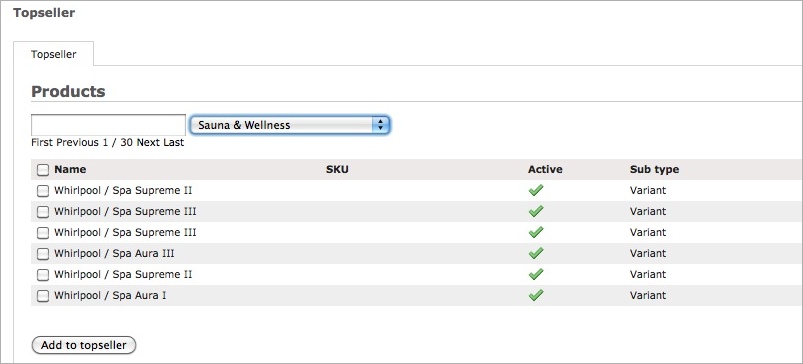
../../../_images/topseller_products.jpg

Update featured products

To update featured products change the entries in question and click on the Save featured button (see image below).

Remove featured products

To remove featured products check the check boxes beside the products you want to remove (within the Featured products section) and click on Remove from featured.
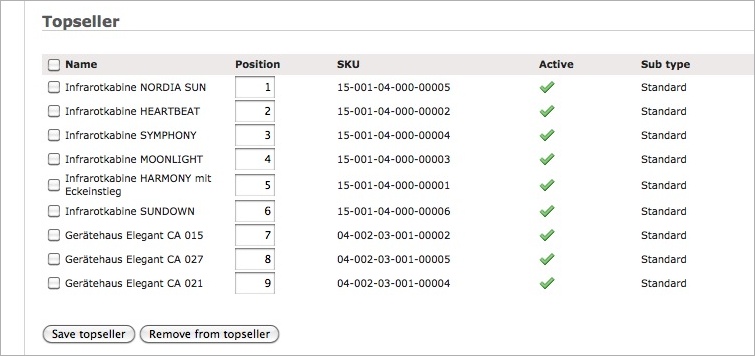
../../../_images/topseller_topseller.jpg

See also

Marketing Features

Previous Next

© Copyright 2009-2026, Kai Diefenbach, et al..

Built with Sphinx using a theme provided by Read the Docs.